Why is my iPhone video blurry on Android, and how to send it clearly
Published 10 October 2026 · 6 min read
A video you send from an iPhone to an Android phone looks blurry because it usually travels as a text message (MMS), and MMS only allows a very small file, so the video is squeezed far below its original quality before it is sent. To send a clear copy, avoid plain texting: share an iCloud or Google Drive link, use a chat app that works on both phones, or, if it has to be a text, shrink the clip yourself so it fits.
This guide explains what happens, what you can check on your iPhone, and the options in order of quality. Minivid, an iPhone app that compresses video on the phone itself, is one of them; the others need no app at all.
Why do videos look blurry when I text them from iPhone to Android?
Between two iPhones, Messages sends the video over the internet as iMessage (the blue bubbles). Apple publishes no size limit for it, and in practice videos of around 100 MB are widely reported to go through. To an Android phone, Messages usually falls back to SMS/MMS (the green bubbles), which was designed for small pictures, not video.
The MMS size limit is set by each mobile carrier, and it is small: commonly somewhere between a few hundred kilobytes and a few megabytes. To make the video fit, it is re-encoded at a lower resolution and a much lower bitrate. That is the softness and blockiness you see. The loss happens on the way, so the file on your iPhone is still sharp.
A second cause can add to it. If the recipient opens the video in a chat app that recompresses on its own, such as WhatsApp, the picture is squeezed again.
Does RCS fix it?
Often it helps. RCS is the newer standard that replaces MMS between iPhone and Android, and iPhones support it from iOS 18. It carries media at a better quality than MMS. Whether it is on depends on your iOS version, your carrier, and the other person’s phone and carrier.
To check, open Settings and look for Messages, then RCS Messaging (the exact menu path differs between iOS versions). If the option is missing, your carrier or iOS version does not support it yet. Even with RCS on, a conversation falls back to MMS when the other side is not ready, so a blurry video can still happen.
How do I send a clear video from iPhone to Android?
From best quality to least effort:
| Option | Quality the other person sees | Good to know |
|---|---|---|
| iCloud or Google Drive link | Original | The viewer opens a link; an iCloud link works in a browser on Android and lasts 30 days |
| A chat app both of you use (Telegram, Signal, WhatsApp…) | Good, but some apps recompress | WhatsApp sends video as media only up to a small size; the other apps have their own limits |
| Original, if it fits | Most providers cap an attachment at about 20 to 25 MB | |
| Minivid, then a text message | Lower, but sharper than the carrier’s own squeeze | Fits a small size you choose, with the result shown before it starts |
How do I send a link instead of the file?
- 1In Photos, open the video and tap Share.
- 2With iCloud Photos on, choose Copy iCloud Link. Otherwise, upload the video to Google Drive, OneDrive or Dropbox and copy its share link.
- 3Paste the link into your message. The other person taps it and watches in their browser, at the original quality.
The trade-off is that the video plays from a web page rather than inside the chat, and it stays on that service until you remove the link. Our comparison of an iCloud link versus compressing helps you decide.
What if it has to be a text message?
Then control the squeeze yourself. A video you shrink on purpose looks better than one the carrier crushes, and it is far more likely to arrive at all. Two things help whatever tool you use: trim the clip to the moment that matters (a few seconds fits much better than a minute), and expect a lower resolution.
A rough sense of scale: 1 MB is about 8 megabits, so a 10-second clip at that size gets under 1 Mbps for video and sound together. That is watchable on a phone, but 4K or a long clip cannot look good in a text message at any setting.
How does Minivid help with this?
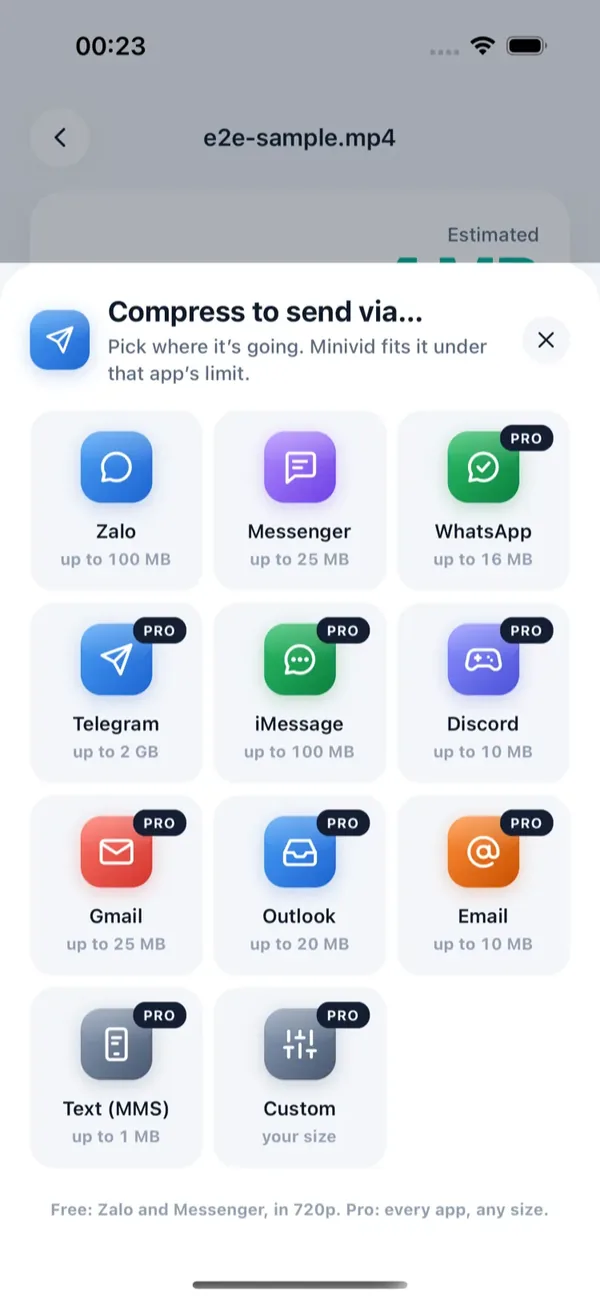
Minivid has two destinations for this. Text (MMS) fits the video to 1 MB, a size that goes through on almost every carrier, and caps the long side at 640 pixels. iMessage fits it to 100 MB at up to 1080p, a conservative figure for blue-bubble chats. Here is the flow:
- 1Open Minivid and pick the video.
- 2Tap Send via… and choose Text (MMS).
- 3Minivid shows the size the result will have before it encodes anything. If the clip is too long to stay watchable at 1 MB, it says so; trimming is free and the estimate updates as you drag the handles.
- 4Tap Compress and keep Minivid open while it runs.
- 5Tap the send button to open the iOS share sheet and choose Messages.
Minivid never sends the message or signs in to anything; it writes a smaller copy on your iPhone and you send it yourself. The original is never modified, nothing is uploaded, and it works in airplane mode. Send via Text (MMS) and iMessage are part of Minivid Pro; in the free tier, Send via covers Zalo and Messenger.
Frequently asked questions
Why is the video blurry on Android but fine on my iPhone?
Because it was re-encoded on the way. A text message to Android usually goes as MMS, which allows only a very small file, so the video is shrunk hard to fit. The original on your iPhone is unchanged.
How can I send a full-quality video to an Android phone?
Send a link instead of the file: copy an iCloud link in Photos or share a Google Drive link. The other person watches it in their browser at the original quality. A chat app both of you use, or email for short clips, also works.
Does turning on RCS make videos sharp?
It can improve things, since RCS carries media at better quality than MMS, but it needs iOS 18 or later, carrier support and a compatible phone on the other end. If any part is missing, the chat falls back to MMS.
What is the video size limit for MMS?
It is set by each carrier and is small, commonly from a few hundred kilobytes up to a few megabytes. Minivid uses 1 MB for its Text (MMS) option because that goes through on almost every carrier.
Does Minivid send the message or upload my video?
No. It compresses on your iPhone and opens the iOS share sheet, so you send the file yourself. The original video is not changed. Text (MMS) and iMessage destinations are part of Pro.
Want to know the size before you compress?
Minivid compresses video on your iPhone and shows the final size before it starts. Your videos are never uploaded.